Meeting Scheduling
Meeting management software for trade shows,
without the spreadsheet or the double bookings.
One master schedule for every meeting at the show: who attends, which room, which slot. Lodago checks everyone’s real availability, sends the Outlook or Google invite, and keeps every calendar up to date when plans change.

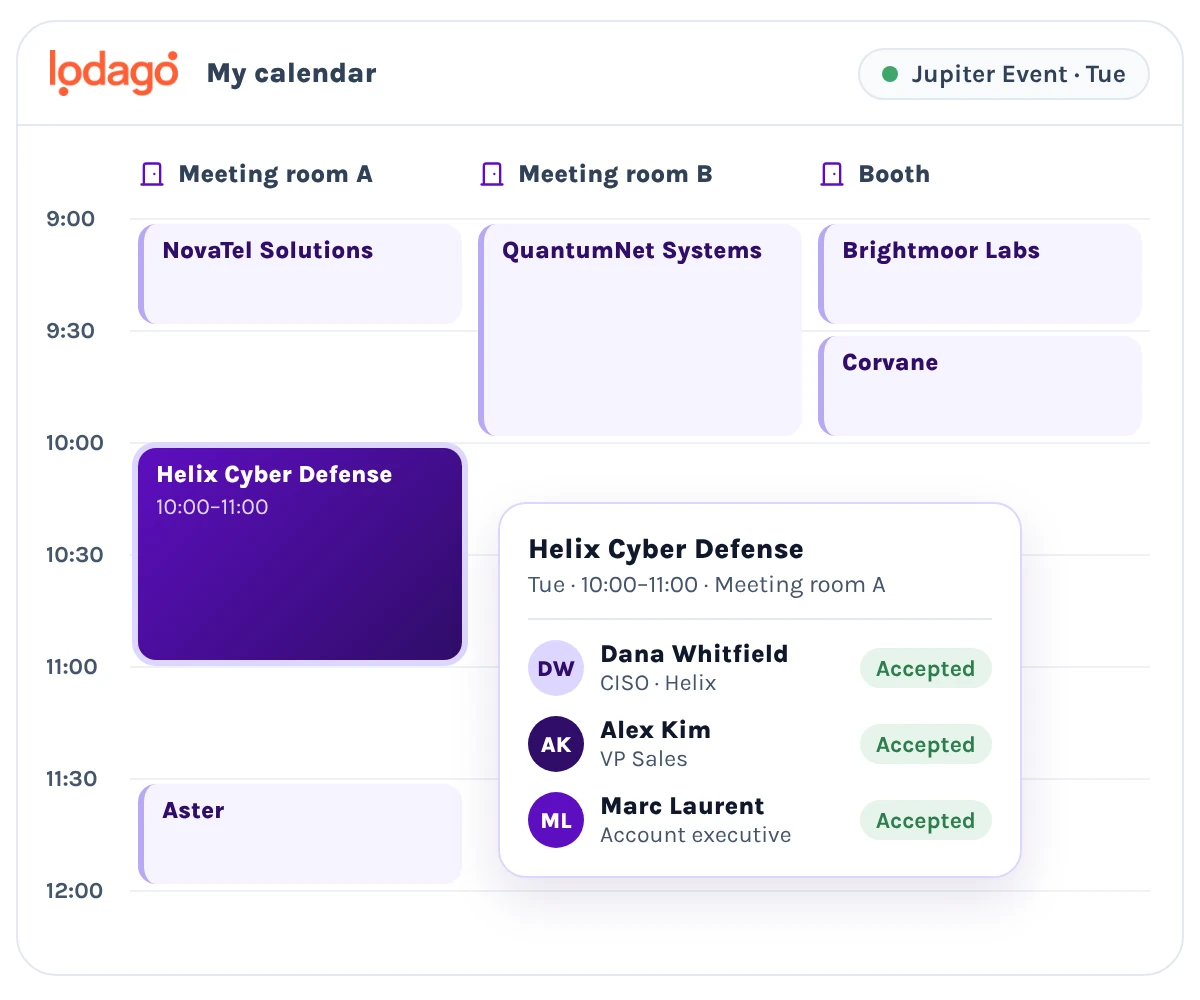
Booking one meeting shouldn’t take five people and a side spreadsheet.
For most exhibiting teams, meetings are booked over email, tracked in Excel and checked against a separate sheet to catch conflicts. People end up double booked and don’t show up where they should be. Rooms get blocked with fake meetings, just to keep them free for later. And the event team spends the show babysitting every meeting.
Everything about the meeting, in the meeting.
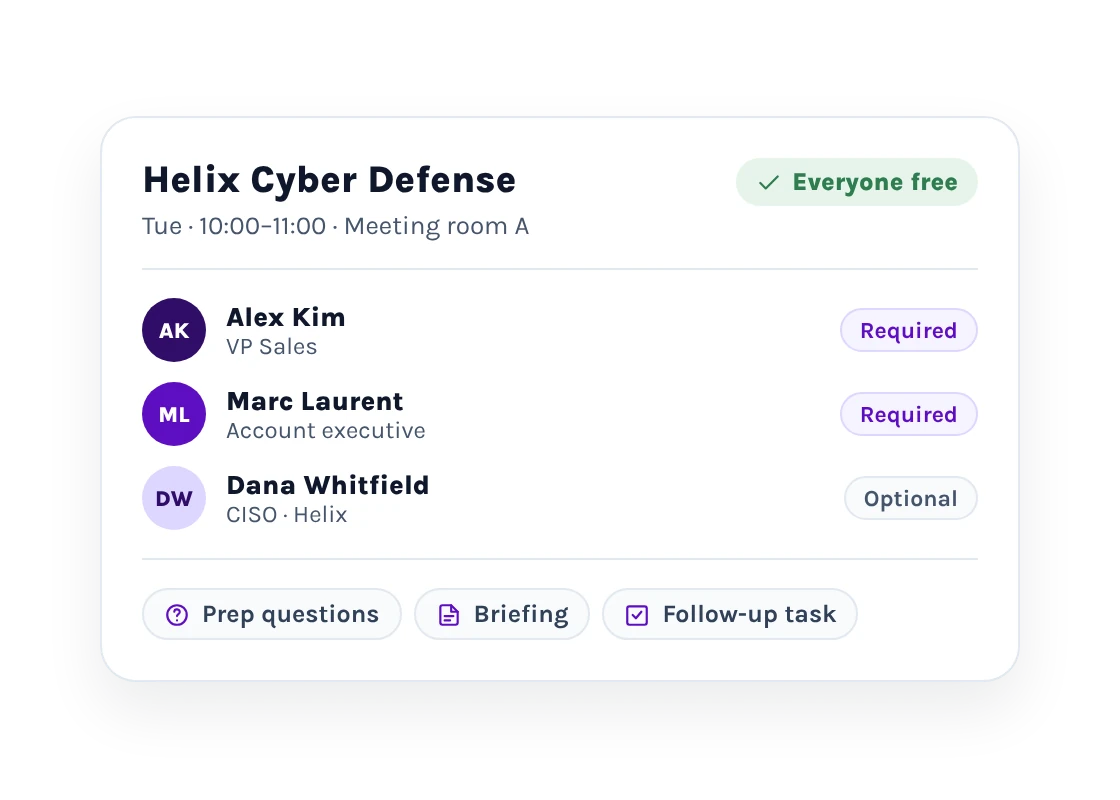
Add the attendees the meeting needs, whether required or optional, choose the room, and Lodago only offers times when everyone is free. Offsite meetings, away from your booth, are booked the same way.
Each meeting also carries what makes it worth having: prep questions answered by whoever requested it, internal documents, meeting briefings guests never see, and notes and a follow-up task afterwards, so no meeting ends without a next step.
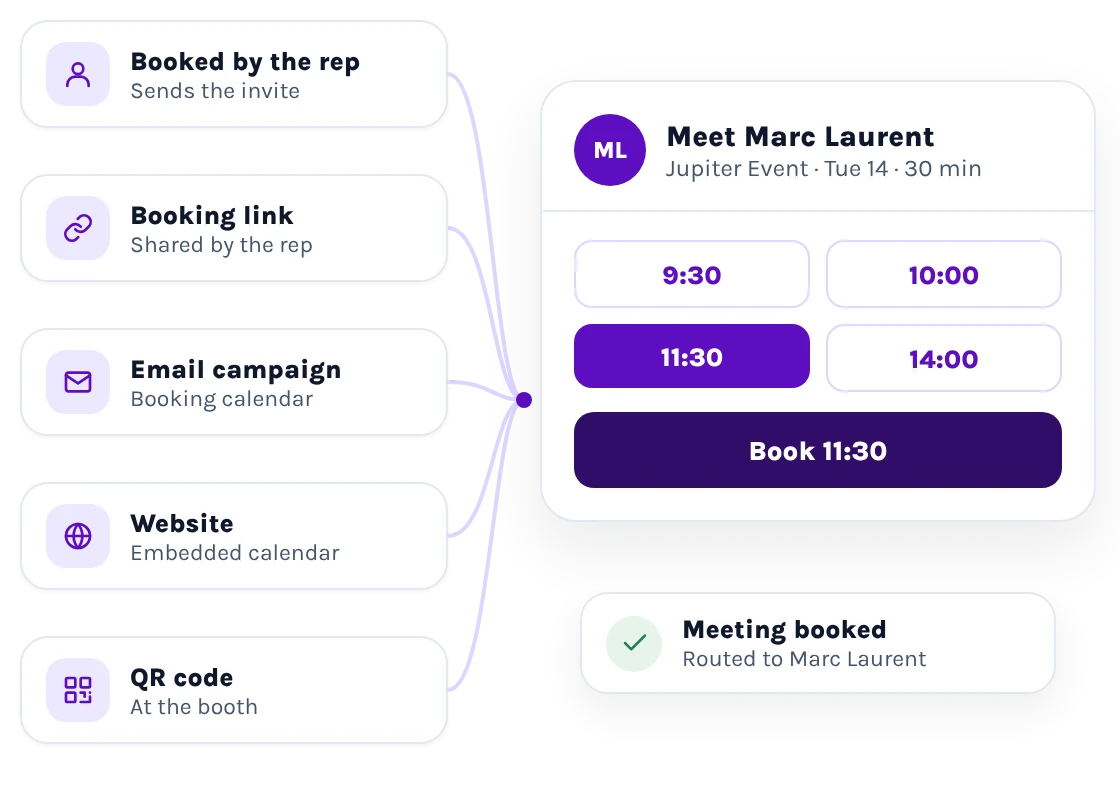
Pick the slot yourself, or let prospects and customers choose.
Already agreed on a time to meet? Select it yourself. Want to avoid the back-and-forth by email? Share your branded booking link. Want to add a booking calendar to your email campaigns, your website or a QR code at your booth, and have every meeting routed automatically to the right salesperson? Lodago does it for you. And the AI Copilot can brand your booking pages, company-wide, per event or per link.
-
Approval workflows that match how your company works.
Set up approval steps for the meetings that need them, such as executive meetings or key accounts. Requests wait for sign-off before invites go out, so nothing reaches a customer’s calendar until the right person has approved it.
-
No more side spreadsheet to catch conflicts.
Prevent double bookings of both your sales reps and meeting spaces. Availability is managed according to your preferences, whether through Outlook, Google Calendar, or directly in Lodago. View every meeting by sales rep, time slot, or meeting space in one centralized dashboard.
-
Outlook and Google invites from your own domain.
Calendar invites are sent from your sales reps’ email addresses or a generic company mailbox, never from a Lodago email address. Customize the subject and description per event or per meeting. See who accepted, who is pending and who declined, live.
-
Know who showed up.
Your team can check in prospects and customers by scanning their QR codes or simply marking who attended and who didn’t show up, directly during the event. Keep attendance records accurate and up to date in real time. Someone didn’t show up? Reschedule the meeting on the spot.
Meeting management software that scales with your team.
Built for teams of every size, from growth-stage startups to enterprises, including Fortune 500 and NASDAQ-listed companies: unlimited users and admins on every contract, seven user roles, and calendars and forms in more than 40 languages.
Everything you need to know about meeting management at trade shows
Can Lodago schedule executive meetings at a trade show?
Yes. Add every executive the meeting needs, set an approval step if you want one, and Lodago only offers times when all of them are free.
How does Lodago avoid double bookings?
It checks each attendee’s availability, whether it comes from Outlook, Google Calendar or directly from Lodago, and each meeting space’s bookings before offering a time.
Can prospects and customers choose their own time?
Yes. Send them a booking link, or put one on your website.
Do invites go to Outlook and Google Calendar?
Yes, from your own email address, with live accepted, pending and declined status.
Can we prepare for a meeting and track the follow-up in Lodago?
Yes. Each meeting holds its meeting briefing, prep questions, internal documents, notes and follow-up tasks, and it all syncs to your CRM.
Related reading: Booth meeting strategy: how to make every slot count · How to reduce no-shows for trade show booth meetings
See Lodago’s meeting management on your next show.
Book a demo and we’ll walk through your upcoming event and your team’s calendars — and show you how one master schedule replaces the spreadsheet, the back-and-forth and the double bookings.
Book a call
We review your event needs together.

Personalized onboarding
Tailored to your team and your stack.

Lifetime support
We’re here every step of the way.